

Chengran (Felix) Guan
2026-08-29 · 11 min read
AI Avatar Videos for Real Estate:
Market Updates and Listing Tours Without Filming
AI avatar videos let real estate agents publish professional market updates and listing tours without ever turning on a camera. An AI avatar is a digital presenter that reads your script on video: you write the words, choose a presenter and voice, and the platform renders a finished clip. In 2026 this is no longer a novelty — real estate-specific avatar products launched this year, and agents are using them to post weekly market updates that used to require a full filming session. Here is how AI avatar videos work, where they fit in your marketing, and how to keep them trustworthy.
Key Takeaways
- An AI avatar video is a script you write and a presenter you never film. You choose the face, voice, and setting; the tool generates the delivery.
- Best uses are recurring formats: weekly market updates, listing overviews, neighborhood guides, and FAQ content.
- Pair the avatar with real property footage. The strongest videos mix a digital presenter with actual listing photos and clips edited together in one place.
- Disclosure is non-negotiable. Tell viewers and clients when a presenter is AI-generated, and check your local MLS rules.
- Start small: one 60-second market update per week beats a polished studio video you never publish.
What Is an AI Avatar Video for Real Estate?
An AI avatar video is a narrated video where a synthetic presenter delivers your script while property photos, footage, or graphics appear on screen. You type a script or paste a listing description, pick a presenter from a library (or create one that resembles you), select a voice, and the platform generates the talking-head segment automatically. VideoGuru runs this end to end for property media: it generates the AI avatar from a headshot you upload and clones your own voice for the narration, then composites the presenter into the walkthrough it builds from your listing photos — no second tool and no manual assembly step.
The avatar segment is one ingredient. The final video — with your listing photos, captions, music, and branding layered around it — is the part buyers actually see. That is where an AI real estate media workflow comes in: the presenter handles the face time, and an AI video editor handles everything else.
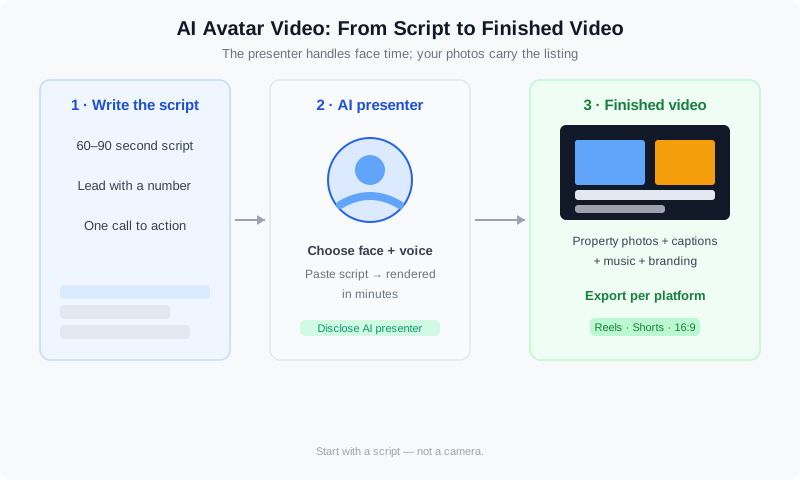
An AI avatar video combines a synthetic presenter with your listing photos and footage.
Why Agents Are Adding AI Presenters in 2026
Buyers now expect more than a photo gallery when they browse a listing. Recent industry coverage of AI-enhanced video marketing makes the same point: video is becoming the default way properties get discovered, and agents who publish consistently stay in front of more buyers.
The blocker has never been willingness — it is time. Filming a clean market update takes setup, retakes, and editing. AI avatar tools remove the camera from that equation, which is why they gained traction so quickly in 2026: a tool that turns a typed script into a finished presenter video in minutes directly solves the weekly content problem.
There is also a camera-shyness factor. Many agents know video works but dread watching themselves on screen. An AI presenter gives you a professional-looking on-camera presence while you keep the real relationship-building for calls and showings. For agent research on what buyers expect, NAR's research and statistics library is the authoritative source on how home buyers shop and what they look for in an agent.
The numbers behind the shift are consistent. The most-cited real estate video statistics trace back to 2018, when listings marketed with video began earning roughly 403% more inquiries than photo-only listings — and the gap has only widened as video became the default. More recent real estate video stats point the same way: NAR data shows about 73% of sellers are more likely to list with an agent who uses video, and buyers consistently rank video as the most useful part of an online listing. That is why real estate market update videos and real estate explainer videos convert so well — a listing with video simply gets seen more. Our real estate video analytics guide breaks down which metrics to track once you publish.
The Four Best Uses for AI Avatar Videos
Not every video needs an avatar. These four formats benefit the most because they are script-driven, recurring, and rarely need you physically on location:
- Weekly market updates. Median price, days on market, new inventory — a 60-second summary with your avatar intro and exit keeps you top of mind every single week.
- Listing overviews. A narrated tour of the key selling points, paced over your property photos. This is the highest-converting use because it works for every new listing.
- Neighborhood guides. Schools, commute times, coffee shops, local events. Evergreen content you can post repeatedly for a specific area.
- FAQ and objection-handling clips. "What does this HOA cover?" "How does the offer process work here?" Short answer videos that build trust and recycle across your profiles.
How agents are using AI presenters, virtual staging, and AI video in 2026.
Once you produce one of these formats, you can slice it into a dozen posts — a carousel for Instagram, a clip for TikTok, a longer cut for YouTube. Our guide on repurposing one listing into 30 pieces of content shows the full playbook, and the 30-day social media video calendar tells you which formats to pair with avatar videos each week.
Top AI Avatar Tools for Real Estate Video Walkthroughs
The avatar tool you pick should match how you sell. For a realtor videographer producing walkthroughs for multiple agents, the priority is a large presenter library, voice cloning, and batch export. A real-estate-native platform now covers this route as well: VideoGuru generates the avatar from a headshot, clones your voice, and composites both into the property video. Among the general-purpose avatar platforms, the ones agents and videographers use most in 2026 are Synthesia (the biggest presenter library and cleanest interface), HeyGen (fast lip-sync and the smoothest create-an-avatar-that-looks-like-you flow), D-ID (lightweight talking-head clips from a single photo), Colossyan (built for explainer-style scripts and training), DeepBrain AI (strong multilingual voices for international markets), and Elai.io (simple script-to-video for recurring formats). Most charge a monthly subscription that includes a set number of video minutes, so compare minutes-per-dollar rather than the headline price.
The avatar segment is only half the job. Whichever tool renders your presenter, you still need to assemble it with listing photos, captions, and branding — and that editing step is where the time usually disappears. VideoGuru fits that step for agents and videographers who want it in a single workflow: generate the avatar from a headshot and upload it with your property footage and the AI sequences, captions, and exports a finished walkthrough in minutes. If you prefer a presenter that speaks with your own narration, see our guide to AI voiceover for real estate videos.
How to Create an AI Avatar Video: Step by Step
The whole workflow takes about 20 minutes once you have a template. Here is the sequence that works:
- Write a short script. 60 to 90 seconds is the sweet spot. Lead with the number or news ("Median home price in Westside is up 4 percent this quarter"), then explain why it matters, then end with one call to action.
- Choose your presenter and voice. Pick a natural-sounding voice, not a robotic one. Match the presenter's energy to your market — formal for luxury, casual for first-time buyers.
- Generate the avatar segment. Paste the script, review the output, and fix any awkward phrasing before you build the rest of the video.
- Assemble the full video. Combine the avatar intro and outro with your property photos and clips. Add captions, music, and your logo so it looks like a produced piece, not a talking head.
- Export per platform. Vertical for Reels and Shorts, square for the feed, 16:9 for YouTube — then schedule and publish.
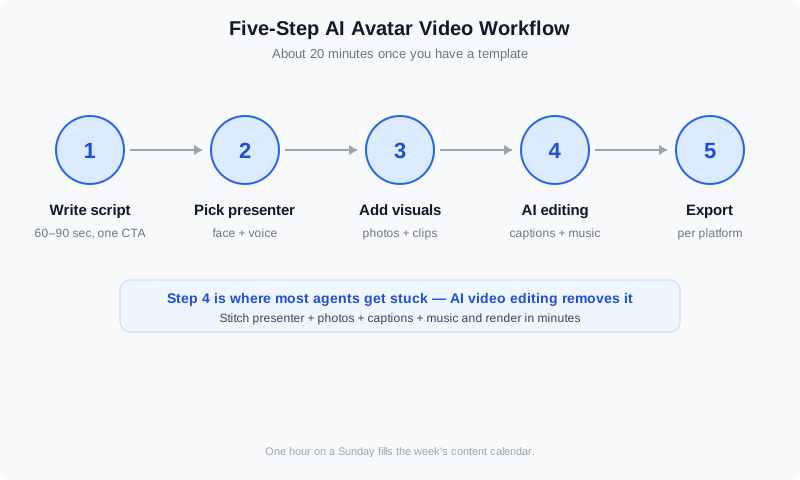
Script, presenter, visuals, edit, export — the five-step avatar video workflow.
Step four is where most agents get stuck, because stitching a presenter clip together with photos, captions, and music used to mean hours in a timeline editor. That is exactly what AI video editing is for. With VideoGuru you can skip the separate avatar clip entirely: upload a headshot and it generates the presenter, clones your own voice, and adds both into the walkthrough it builds from your property footage, then sequences the best moments, adds captions and music, and renders a finished video in minutes — the same approach as our 10-minute listing video guide.
And video is not the only place AI saves you time. The same platform that edits your walkthroughs also handles your listing photography — one-click virtual staging for stills, declutter, furniture swap, and decor changes for photos — so your avatar video and your listing images stay visually consistent.
Authenticity Rules: Keeping AI Presenters Trustworthy
AI presenters only work if your audience trusts them. Follow these rules and you get the consistency of a virtual host without the credibility risk:
- Disclose the AI presenter. A simple line in the caption ("Presented by an AI avatar") or a visual label is enough for social media. Hidden synthetic media erodes trust fast.
- Never present the avatar as a live broadcast. Do not label an avatar video "live" or imply you are streaming.
- Keep claims verifiable. The avatar says what you wrote — market stats and price claims must be accurate and current, just like any other listing content.
- Mix in real footage. Property photos and walkthrough clips are real; pair them with the avatar so buyers see the actual home, not just a presenter.
- Check MLS rules before uploading. Some MLSs require AI-generated content to be labeled or restrict synthetic media on listing pages.
Do I need to disclose AI avatar videos to my clients?
Yes — treat disclosure as the default. Label the video as AI-generated in the caption or on screen, and tell the client whose listing it is. Real estate is a trust business, and the disclosure conversation is far cheaper than the "why didn't you tell me" conversation. The rules around AI-generated content are tightening, and the same care applies to photos: our guide to AI photo disclosure rules in 2026 covers the regulatory picture you need to know.
AI Avatar Videos vs. Filming Yourself: What Each Is For
AI avatars are a tool, not a replacement for your face. The right choice depends on the format, the audience, and how much time you have this week:
| Format | AI avatar | Filming yourself |
|---|---|---|
| Weekly market update | Best fit — fast, consistent, script-driven | Works if you enjoy the setup every week |
| New listing tour | Great for the overview; add real walkthrough clips | Best for personality and showing you know the home |
| Testimonial and client stories | Not a fit — authenticity is the whole point | Always film the real person |
| FAQ and explainers | Strong fit for repetitive questions | Fine, but hard to keep consistent |
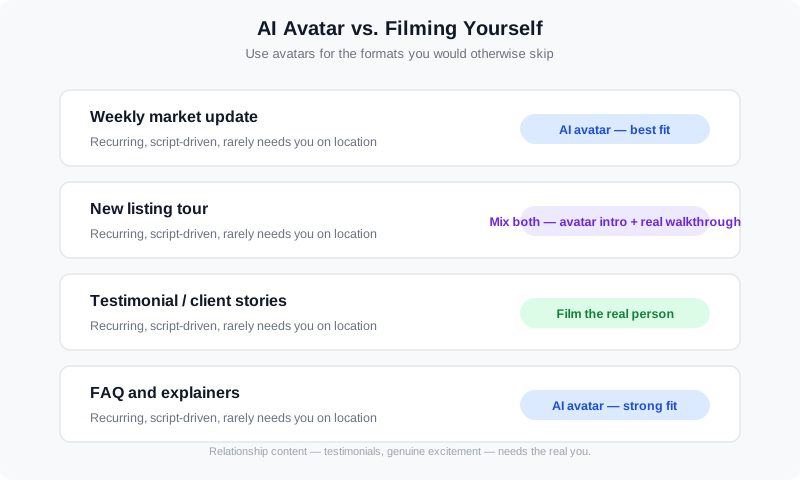
Recurring script-driven formats suit AI avatars; relationship content needs the real you.
A practical split: use avatars for the formats you would otherwise skip — the weekly update, the neighborhood guide, the FAQ — and keep real on-camera video for moments that matter, like a new listing you are genuinely excited about. For platform-specific advice on where each format performs best, see our guide to Instagram, TikTok, and YouTube Shorts for real estate.
Frequently Asked Questions
Are AI avatar videos allowed on the MLS and social media platforms?
Social platforms generally allow AI-generated video as long as it follows their synthetic-media labeling rules. MLS policies vary: some allow AI content with a disclosure, others restrict synthetic media on listing pages. Check your local MLS rules before uploading an avatar video to a listing, and when in doubt, use the video on your own social channels and website instead of the MLS listing itself.
Do AI avatar videos look fake to buyers?
Modern AI presenters look close to real, but close is not the point — usefulness is. Buyers do not reject avatar videos because they look synthetic; they reject videos that waste their time. A clear, 60-second market update with real property photos and accurate numbers earns attention regardless of who presents it. Keep the script tight and the visuals real, and the format works.
How much does it cost to create an AI avatar video?
Avatar platforms typically charge a monthly subscription that includes a set number of video minutes, with higher tiers for more presenters, higher resolution, and commercial use. Costs vary widely by provider and usage level, so the smart move is to start on the entry tier, publish a few market updates, and upgrade only when you are consistently using your monthly allowance.
Can I create an AI avatar that looks like me?
Many avatar platforms offer a custom avatar feature where you record a short video of yourself once, and the platform builds a digital twin that delivers your scripts afterward. That gives you the consistency of an avatar with your own face — a strong middle ground if your brand is personal but your filming time is limited. Record the source video carefully, because the avatar inherits your lighting and audio quality.
Which AI tools make the best real estate agent videos?
For a solo agent the practical stack used to be three tools: an avatar app such as HeyGen, Synthesia, or D-ID to generate the talking-head segment, then an AI video editor to assemble it with listing photos, captions, and music. That assembly step is where VideoGuru fits — and it now covers the first step too. Upload a headshot to generate the avatar and clone your own voice, and VideoGuru adds the presenter into the walkthrough it builds from your listing photos, rendering a finished, branded video in minutes without a separate avatar subscription. Start with one avatar tool on its entry tier and pair it with an editor you use weekly, so the workflow stays sustainable instead of impressive but unused.
What are the best realtor video ideas for an AI avatar?
The formats that fit an AI presenter best are the recurring, script-driven ones: a weekly market update, a neighborhood guide, a listing overview, and short explainer videos that answer common buyer questions. Render them with one of the three avatar tools agents use most — HeyGen, Synthesia, or D-ID — then assemble with listing photos and captions; or generate the presenter and the walkthrough together in VideoGuru, which builds the avatar from a headshot, clones your voice, and adds both into the property video. Our guide to real estate videos that get views shows how to turn these ideas into videos that actually convert.
Ready to publish market updates and listing videos without a camera crew? VideoGuru's AI video editing platform turns your scripts, photos, and footage into polished captioned videos in minutes — and it can generate the on-camera presenter from a headshot, in your own cloned voice, added straight into the walkthrough, so you never need a separate avatar tool. The same AI handles virtual staging and photo enhancement for your stills. Start for free at VideoGuru.
Final Thoughts
AI avatar videos are not about replacing you — they are about removing the excuses that stop you from publishing. The agents getting results in 2026 are the ones shipping a market update every week, not the ones waiting for the perfect studio setup. Write the script, generate the presenter, drop in your real property visuals, and let AI handle the editing. One hour on a Sunday, and your content calendar is full for the week.




