

Chengran (Felix) Guan
2026-08-20 · 11 min read
How Outsourcing Video Editing Backfired — And What Fixed It
Outsourcing video editing backfired for one real estate photographer because the pipeline, not the editors, was the bottleneck. When delivery deadlines slipped, quality drifted between editors, and client calls went quiet, the problem wasn't the people — it was a handoff process with no quality gate, no style standard, and no visibility into where videos sat in the queue. The fix was bringing production control back in-house with an automated editing workflow.
This case study walks through what broke, what it cost, and the exact pipeline changes that restored reliability — with the timeline and before/after numbers a photographer can actually plan around.
Key Takeaways
- Outsourcing without a pipeline is just moving the queue. The bottleneck shifted from editing time to review loops, rework, and waiting on revisions.
- Quality drift is the hidden cost. Every editor has a different style; without a locked reference, the same property can come back looking like two different shoots.
- Turnaround time is the metric clients actually judge. A video delivered two days late costs more trust than a slightly rougher edit delivered on time.
- Automation fixed the pipeline, not the people. Standardized templates, automated assembly, and a single approval step restored consistency and cut total delivery time.
- Hybrid is the realistic model. Most photographers land on automated AI editing for the bulk pass, with human review for the final sign-off.
The Story: Scaling on Paper, Failing in Practice
This photographer — call him Mark — ran a two-person real estate media business doing stills, video walkthroughs, and drone work. At around 15 shoots per week, editing was eating his evenings. The standard advice at that point is to outsource, and the industry data supports it: photographers scaling past 15–20 shoots per week almost uniformly rely on an outsourced editing service, according to a June 2026 breakdown from photo editing provider photoup.net.
Mark hired two part-time video editors through a freelance marketplace. For the first month, it looked like a win. He cleared 12 hours a week and took on two more agent clients. Then the cracks appeared: a walkthrough delivered with the wrong end card, a color grade that didn't match the listing photos, and a deadline missed because a file sat in an editor's inbox for three days.
None of this was malice. The editors were skilled. The failure was structural — there was no documented style, no checklist, no handoff standard, and no way for Mark to see where any video was in the queue. The classic outsourcing failure pattern that editing services themselves document: inconsistent edits, unclear communication, and delayed delivery. A May 2026 workflow guide from Imagtor identifies exactly these three failure modes as the reason structured workflows matter before any editor is hired.
What Actually Broke
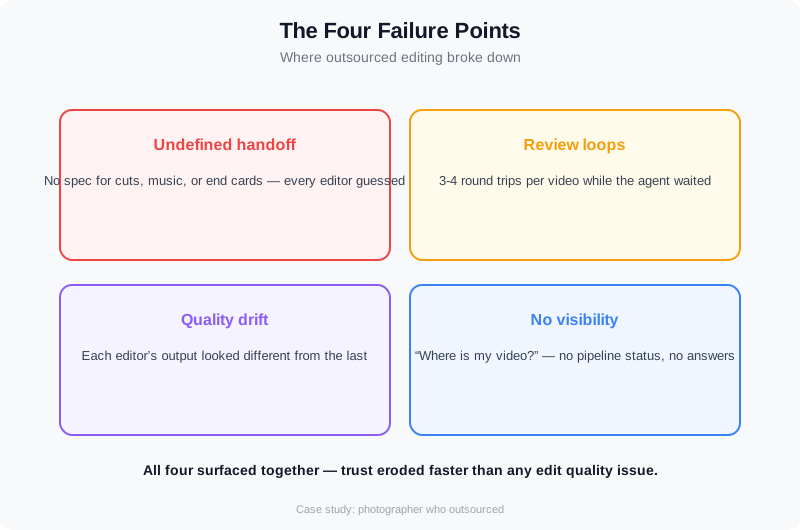
Break it down by failure, not by blame. Four things broke in sequence.
First, the handoff was undefined. Mark sent a Google Drive link and a text message: "here are the clips, make it good." Each editor interpreted that differently. One built a cinematic montage with music; the other delivered a straight cut with no pacing. Both were reasonable responses to an unreasonable brief. There was no shot list, no reference video, no brand spec.
Second, review loops multiplied. Every video now took two or three round trips: initial edit, revision notes, second pass. Mark spent more time writing feedback than he would have spent editing. The 12 hours he reclaimed each week turned into 9 hours of review and coordination.
Third, quality drifted week over week. Without a locked style reference, editor A's warm grade and editor B's neutral grade meant the same agent's listings looked inconsistent across their portfolio. Agents noticed. One asked why the video for the new listing "didn't look like the last one."
Fourth, there was no visibility. Mark couldn't answer the question every agent eventually asks: "Where is my video?" The answer required messaging two editors and hoping for a reply. That single failure — no pipeline status — eroded trust faster than any edit quality issue.
A practical walkthrough of editing real estate videos, start to finish.
The Real Cost of a Broken Pipeline
The financial damage showed up in three places. The first was rework: roughly a third of delivered videos needed a second pass, which meant paying for editing twice. The second was the review tax — Mark's own hours, which had a real opportunity cost. The third and most expensive was client retention: one agent moved their video work to another provider after two late deliveries, taking roughly 20% of Mark's recurring video revenue with them.
The opportunity cost math is the part most photographers miss. The editors' failures cost Mark money; Mark's own review time cost him growth. Every hour spent re-reviewing a video was an hour not spent booking shoots, upselling photo packages, or building the referral relationships that actually grow a media business. As the pixelshouters analysis frames it, the question isn't whether editing takes time — it's whether your editing workflow is quietly costing you a full workweek every month in rework and management.
The Fix: Rebuilding the Pipeline, Not Replacing the People
Mark's turning point was realizing he had two options: build an elaborate management system around outsourced editors, or rebuild the production pipeline so that most of the editing happened automatically and humans only handled the parts that need judgment. He chose the second. The insight, which mirrors what we hear from photographers who switch to automated workflows, is that the scaling problem is usually the outsourced production pipeline — not the speed of any single editor.
The new pipeline had four stages:
- Capture standardization. A fixed shot list per listing type: 6 exterior, 8 interior, 3 detail, 1 drone opening. Same order every time. This made the edit predictable before it started.
- Automated assembly. Upload the clips to an AI video editor, apply a locked template — intro, pacing, transitions, captions, end card. The bulk pass takes minutes instead of hours.
- Single human pass. Mark reviews the auto-assembled cut once, adjusts pacing or music where needed, and approves. One review instead of three.
- Locked delivery spec. Same export settings, same naming convention, same end card. Every video out the door looks like it came from the same studio — because it did.
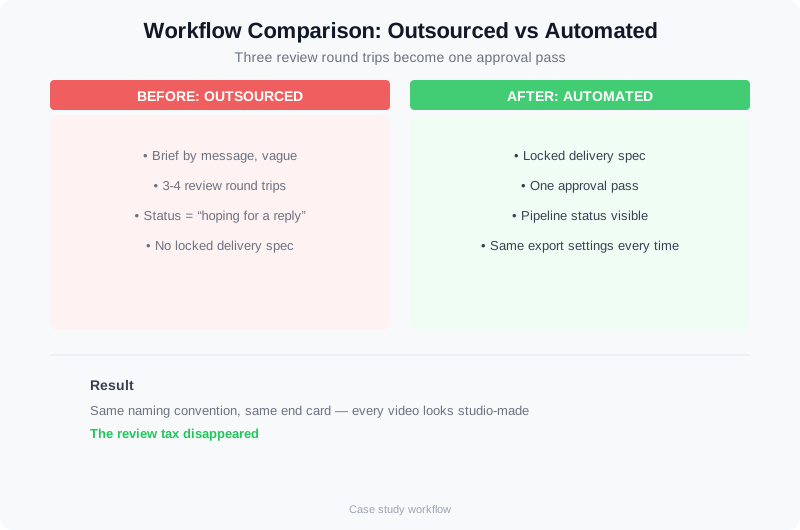
Before: three review round trips and no visibility. After: automated assembly plus one approval pass.
Before and After: What Changed
The before/after numbers tell the story. Use these as planning ranges, not promises — every market and every shoot cadence differs.
| Metric | Outsourced (before) | Automated (after) |
|---|---|---|
| Total time per video | 2–4 hours (editing + review + rework) | 30–60 minutes (review pass only) |
| Review round trips | 2–3 per video | 1 per video |
| Delivery window | 3–5 days, sometimes later | Same day or next morning |
| Style consistency | Drifted between editors | Locked template, identical look |
| Pipeline visibility | None ("where is it?") | Clear — videos render on demand |
Within six weeks, Mark was back to delivering every video on time, and he had reclaimed more time than outsourcing ever gave him — because the review tax disappeared. He kept the two freelance editors for overflow shoots and complex custom projects, but the bulk of his volume now runs through the automated pipeline.
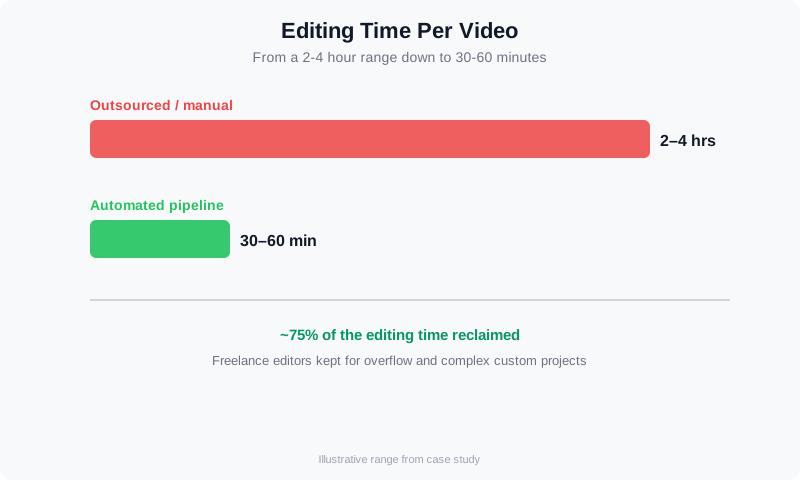
Per-video time dropped from a 2–4 hour range to 30–60 minutes when the bulk edit became automated.
How to Edit a Real Estate Video in One Pass
After the pipeline broke, Mark rebuilt it around a single question: what is the fewest hands a listing video has to pass through? The answer turned out to be two — an AI pass and a human approval pass. Here is how to edit a real estate video the same way. Start with a fixed shot list per listing type (six exterior, eight interior, three detail, one drone opening) so the edit is predictable before any clip is loaded. Upload the footage to a real estate video editing app, apply a locked template — intro, pacing, captions, end card — and let the app assemble the bulk pass in minutes. Finish with one human pass for pacing and music, then export.
The app you choose matters less than the template you lock. If you are comparing options, start with our roundup of the best video editing app for real estate — it covers pricing, turnaround, and which tools handle real estate videography editing well. For the full start-to-finish workflow, see our guide to the real estate video maker. Whether you edit real estate video yourself or run it through an app, the rule is the same for every property video edit: standardize capture, automate assembly, and reserve human time for judgment.
For agents and photographers who want that one-pass workflow without building it themselves, VideoGuru turns the clips you already shoot into a branded walkthrough — automated assembly, locked templates, and a single review pass, with vertical and horizontal exports in one render. It is the same pipeline that fixed Mark's business, productized.
Video Editing for Remodeling Companies and Remodelers
The same failure pattern shows up in an adjacent niche: video editing for remodeling companies. A remodeler films the before, the demo work, and the finished reveal, sends the raw clips to a generalist editor, and gets back a video that misses the money shots. Remodelers need the same fix photographers do: a template built around a before/during/after structure with a locked end card for the company name and contact. Video editing for remodelers works when the shot list is standardized — site walkthrough, key demo cuts, finished reveal — and the edit runs through a template rather than a freelancer's guess.
The payoff is the number every property-video business quotes: a completed project video is a remodeling company's best referral asset, because past clients share their own renovation. Automated assembly turns an hour of raw footage into a client-ready property video edit in minutes. VideoGuru builds those before-and-after project videos from the clips remodelers already film, so a two-person company can post a branded video for every job instead of only the flagship ones. For a closer look at turning renovation footage into visuals, see our guide to AI renovation visualization for real estate.
Why Automation Fixed What Outsourcing Couldn't
The core reason the automated pipeline succeeded where outsourcing failed: it removed the coordination tax. Outsourcing moved the work but kept the coordination. Every handoff still required a brief, a review, a revision cycle, and a status check. Automation collapsed those steps because the editing itself became deterministic — the same inputs produce the same output, every time.
That's the distinction at the heart of the outsource-vs-automate decision, and it's one we walk through in detail in our comparison of white label editing vs. automation for real estate video. Outsourcing is the right answer when you have a documented pipeline and just need more hands. Automation is the right answer when the pipeline itself is the problem — and for most photographers scaling past 10–15 videos per week, the pipeline is the problem.
If you want to see the same pattern at a larger scale, our case study on a media company that automated 200 videos per month shows what happens when the same logic runs across a whole client base. And for photographers still editing everything by hand, our breakdown of how one photographer cut editing time by 80% with AI tools covers the practical toolstack changes in more depth.
Watch: The Editing Pipeline That Fixed a Photographer's Business
A practical walkthrough of a photographer's automated editing pipeline.
Frequently Asked Questions
Should I outsource real estate video editing or automate it?
Outsource when you have a documented pipeline, a locked style reference, and a volume spike you can't cover yourself. Automate when coordination and review time are eating your margins — usually somewhere past 10–15 videos per week. In practice, most photographers end up with a hybrid: automated AI editing for the bulk pass and human editors for custom or high-end work.
How much time does automated video editing save a real estate photographer?
Based on the workflows we see across photographer clients, per-video editing time typically drops from a 2–4 hour range to 30–60 minutes when the bulk edit is automated and the photographer only does a review pass. The bigger win is usually the review tax: one approval instead of two or three revision round trips. Actual numbers depend on shoot length, clip count, and how much custom work each video needs.
What are the signs that my outsourced editing pipeline is failing?
Four signs: videos need a second pass more than occasionally; the same agent's listings look inconsistent from week to week; you can't answer "where is my video?" without messaging someone; and you're spending more time writing revision notes than you used to spend editing. Any one of those is a process problem, not a people problem — and it won't fix itself by hiring another editor.
Which platforms are best for outsourcing real estate video editing?
The best platform depends on your volume and how much structure you bring. General freelance marketplaces — Fiverr, Upwork, and Freelancer — give you access to hundreds of editors at roughly $50–$300 per edit, but quality varies unless you bring a shot list and a style reference. Dedicated video-editing services such as Vidpros, Vidchops, and Video Husky sell a more consistent product with a defined turnaround. What matters more than the platform is the workflow: a documented shot list, a locked template, and a single approval step turn any of them from a gamble into a reliable pipeline.
Is real estate video editing outsourcing still worth it in 2026?
Yes — when you already have a defined pipeline and just need more hands. That is the difference between real estate video editing outsourcing that scales and outsourcing that simply moves the queue. It works for overflow and custom projects; it fails when it becomes your only production process and every video needs two or three revision round trips. Most photographers land on a hybrid: automated AI editing for the bulk pass, with a small bench of freelance editors for high-end and overflow work.
Ready to take the coordination tax out of your video production? VideoGuru's AI video editor builds your listing walkthroughs from the clips you already shoot — automated assembly, locked templates, and a single review pass, right alongside the photo editing and virtual staging tools that handle your stills. Start for free at VideoGuru.
The Takeaway
Outsourcing failed for Mark not because the editors were bad, but because the pipeline had no structure. The fix wasn't more management — it was less manual work: standardized capture, automated assembly, one review pass, and a locked delivery spec. The same lesson applies broadly: real estate media businesses that scale reliably do it by making the production process deterministic, whether that means a documented outsourcing workflow, an automated AI pipeline, or both.
If your editing pipeline is the thing standing between you and taking on more clients, that's a fixable structural problem. The data from the broader industry — from NAR's research library on how buyers and sellers consume listing media to the editing workflow guides from Imagtor and Aryeo — keeps pointing the same direction: structure the workflow first, then decide who or what does the work.




