

Sophia
July 18, 2026 · 16 min read
Real Estate Video Marketing Ideas for Agents:12 Videos You Can Create with AI
Real estate video marketing is no longer only for agents with a production team. Today, the best agents can turn listing photos, walkthrough clips, neighborhood shots, and client moments into polished marketing videos without spending hours in a traditional editor.
If you are wondering, "What videos should real estate agents create?" the answer is simple: create videos that help buyers understand the property, help sellers trust your marketing, and keep your name visible in the local market. This guide covers the 12 core video formats, plus unique real estate marketing ideas beyond the listing video, a simple marketing plan for agents who are starting from zero, and when it makes sense to hire a marketing company instead of using an AI tool.
That includes listing walkthroughs, just-listed videos, neighborhood highlights, virtual staging reveals, open house promos, testimonial videos, market updates, and short social clips. VideoGuru is built for this exact real estate video marketing workflow: upload listing photos or clips, select and order the best shots, add camera motion, apply music and branding, use AI effects, and export videos for Instagram, TikTok, YouTube, MLS-friendly pages, email, and listing websites.
Key Takeaways
- The best real estate marketing videos cover the full client journey: listing promotion, buyer education, seller trust, and local authority.
- Agents can repurpose one listing into a walkthrough, just-listed Reel, open house invite, top-features video, seller recap, and email asset.
- VideoGuru helps agents create branded real estate marketing videos from listing photos or clips without learning a traditional editing timeline.
- The fastest starting point is a photo-to-video listing teaser using photos you already have.
Why Real Estate Video Marketing Matters
Photos show what a listing looks like. Video shows how it feels to move through the home.
That matters because buyers are trying to understand flow, scale, lifestyle, and emotion. A good property video can show the entry sequence, living areas, kitchen layout, bedrooms, backyard, neighborhood, and key selling points in a way static photos cannot.
For sellers, video also strengthens your listing presentation. When you can say, "Every listing gets a polished video, short-form clips, branded social content, and professional visual storytelling," your marketing plan feels more valuable than a standard photo-only package.
- Promote listings more clearly
- Increase showing interest
- Build trust with sellers
- Repurpose one listing shoot into multiple assets
- Stay visible on social media
- Create stronger email and website content
- Compete with agents who only post photos
How VideoGuru Turns Listing Media into Marketing Videos
Before we get into specific video ideas, it helps to understand the workflow. VideoGuru is not a generic video editor with real estate templates added on top. It is designed around the way agents and real estate teams actually create listing media.
- Upload listing photos or video clips
- Select the best media
- Arrange the photos or clips into a property story
- Review crop and camera motion
- Add AI viral effects when a scene needs more impact
- Choose the final format, such as vertical or horizontal
- Add music and branding
- Export branded or unbranded versions
- Download and share the finished video
Upload listing photos
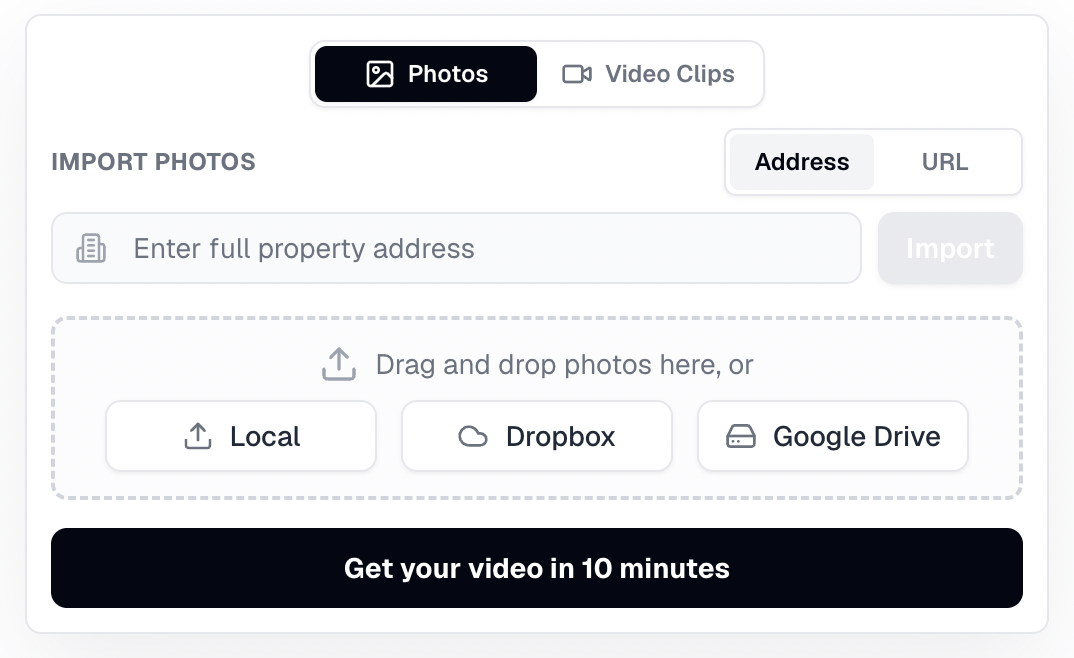
Start with listing photos, clips, or imported property media inside VideoGuru.
With VideoGuru, agents can start from the assets they already have. If you already have listing photos, you do not need to schedule another shoot just to create a video. Upload the photos, choose the best ones, and turn them into a property video with motion, music, and branding.
Select and order photos into a property story
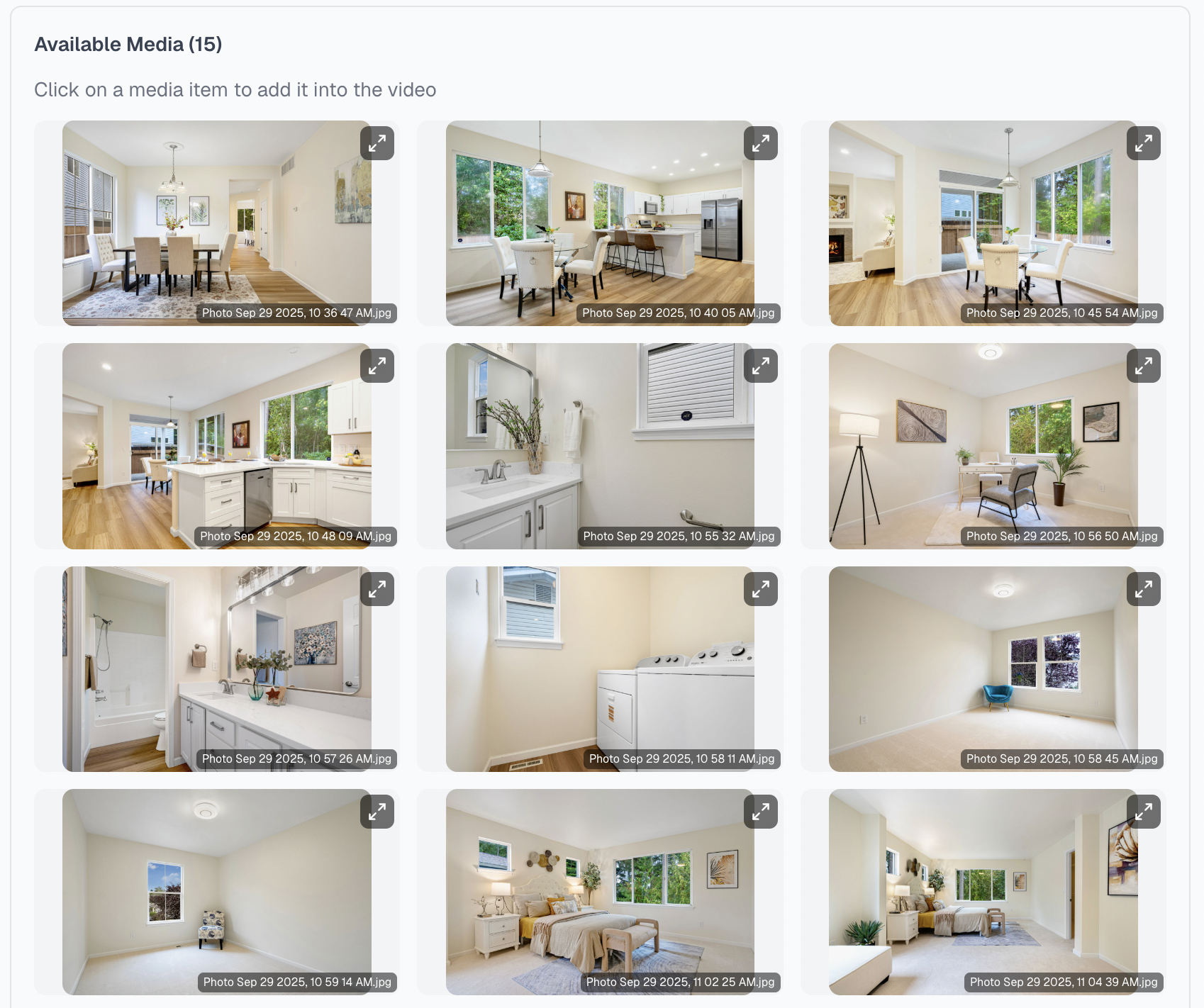
Choose the strongest listing photos before generating the video.
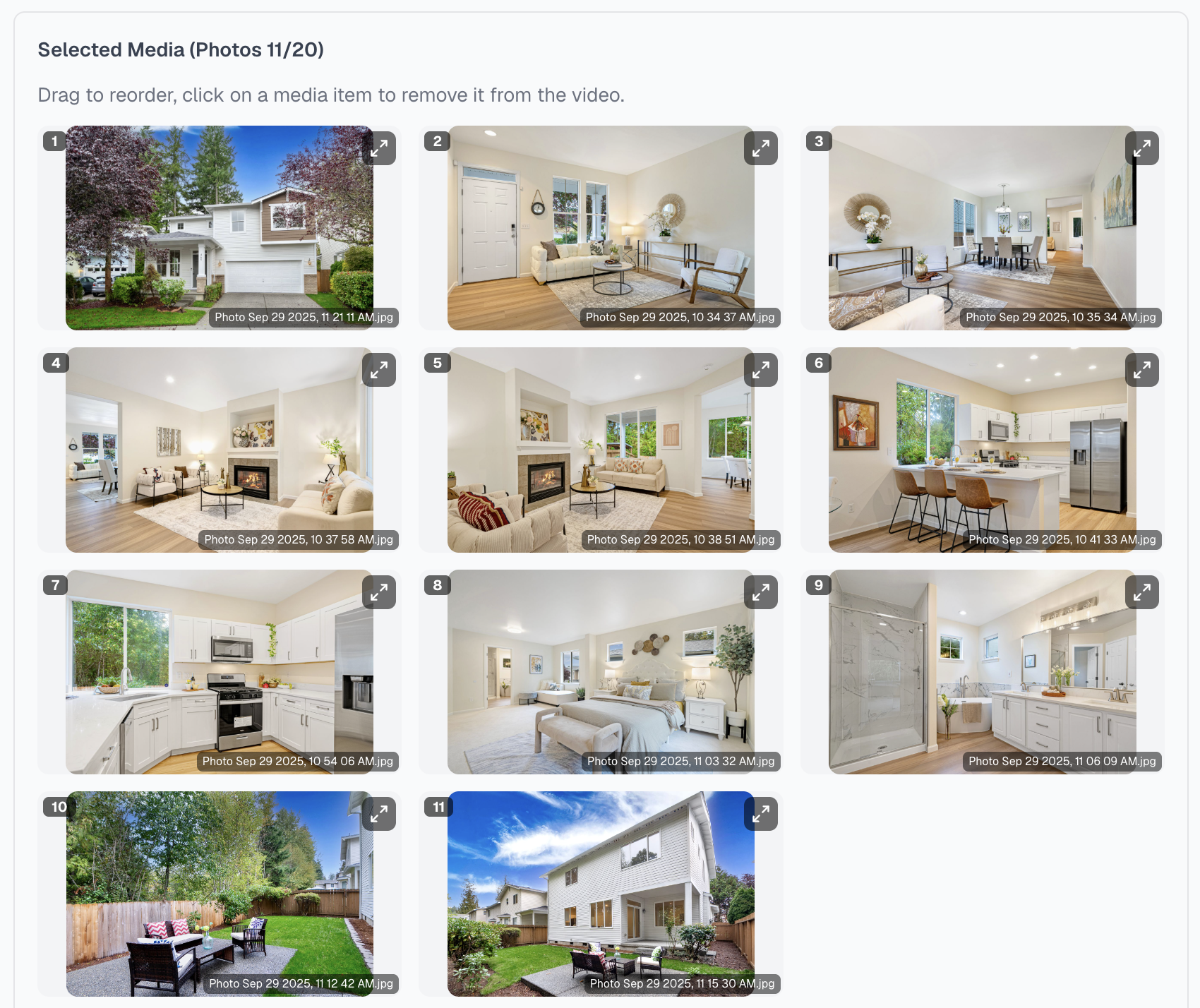
Arrange photos in the order buyers should experience the home.
The order matters. A strong listing video usually follows the way a buyer would experience the home: exterior, entry, living spaces, kitchen, bedrooms, bathrooms, amenities, backyard, and closing shot.
Add AI effects when the listing needs a stronger visual moment
VideoGuru AI effects can add memorable real estate moments inside the video workflow. This official product demo is silent.
VideoGuru supports AI effects for real estate videos. These can help create memorable listing moments, such as cinematic reveals, twilight looks, staging transformations, renovation-style visuals, or more polished transitions.
Add music and branding
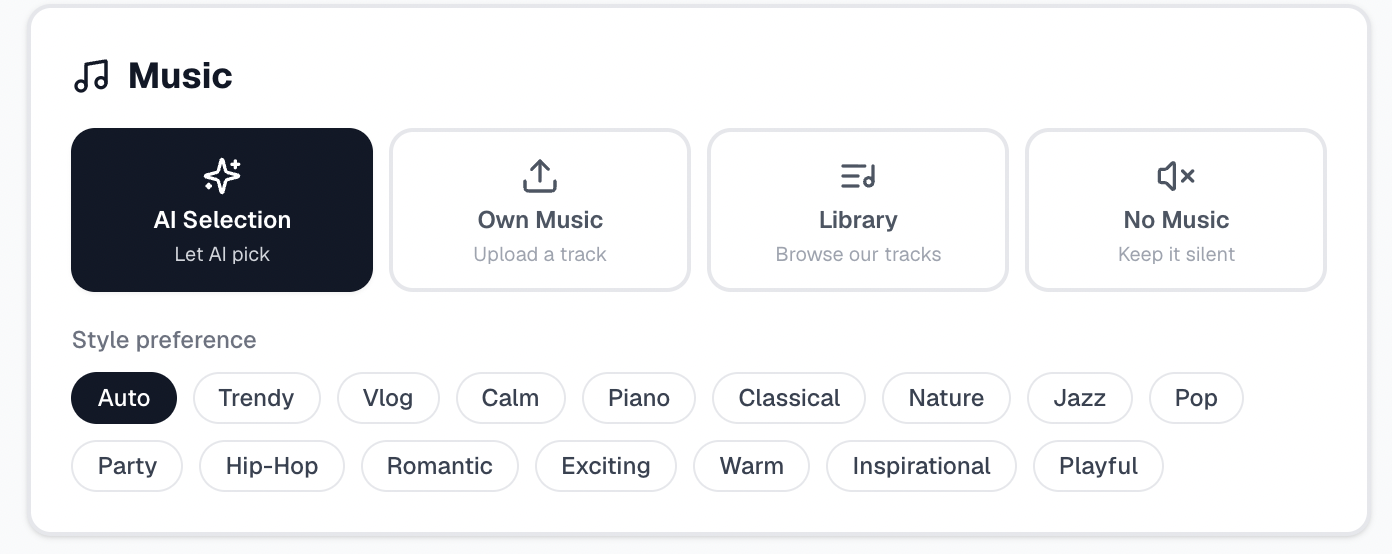
Choose background music that fits the pace and mood of the listing.
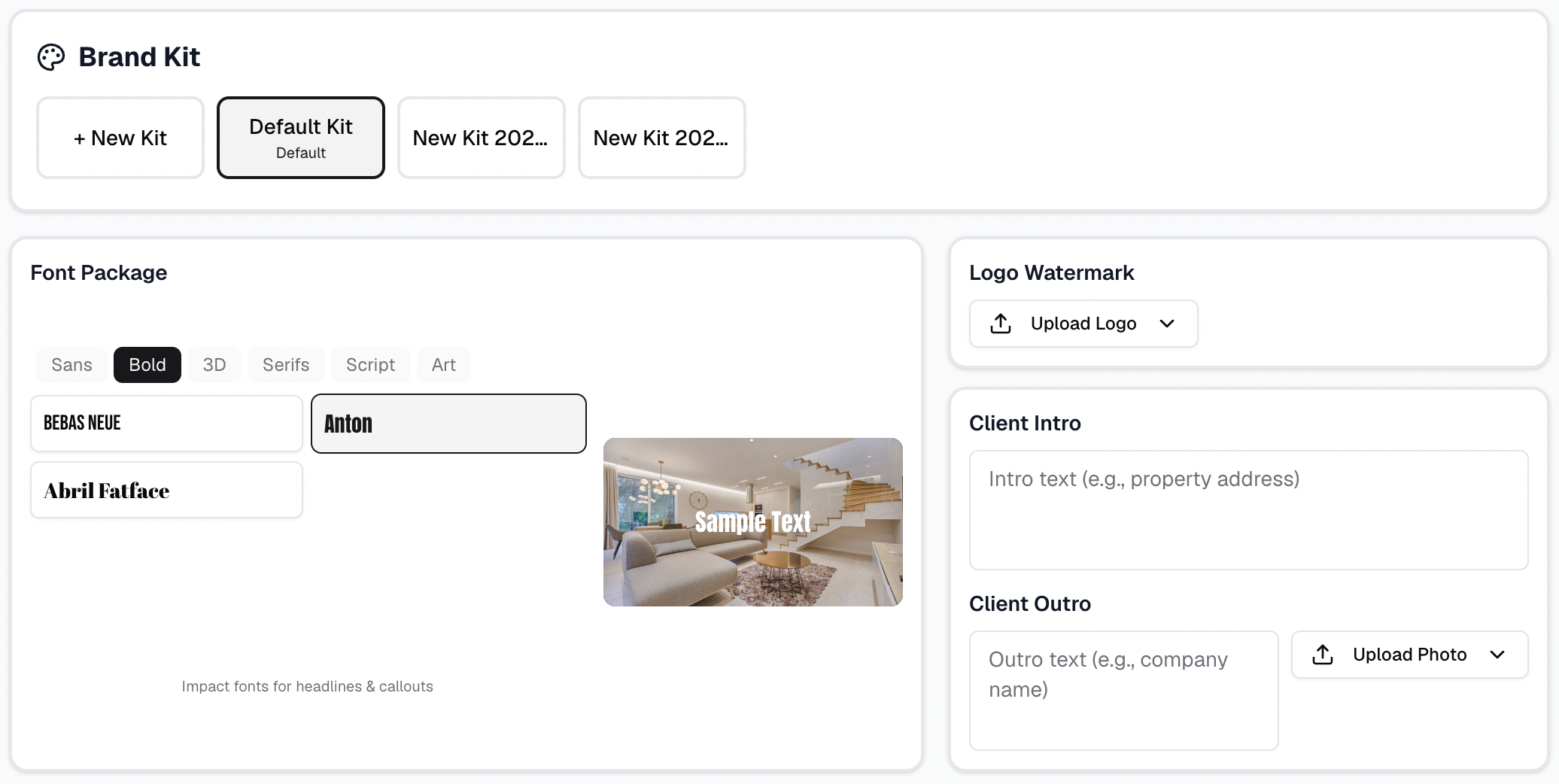
Add logo, intro/outro, and branded export settings for marketing use.
This is where a simple listing video becomes marketing content. Add music, logo, intro/outro, contact information, and choose whether you need a branded or unbranded export.
12 Real Estate Video Marketing Ideas for Agents
1. Listing Walkthrough Video
A listing walkthrough is the foundation of real estate video marketing. It helps buyers understand the flow of a property before they schedule a showing. Use it on listing pages, YouTube, email campaigns, seller updates, and social media previews.
In VideoGuru, agents can create a walkthrough from photos or clips by arranging the media in a logical property sequence, adding camera motion, choosing music, and exporting the finished video. For the detailed workflow, read Create a Real Estate Video in 10 Minutes.
2. Just Listed Video
A just-listed video should be short and direct. Show the exterior, the strongest interior shots, one or two standout features, and a clear CTA such as "Schedule a private showing," "DM for the address," "Open house this weekend," or "See the full tour."
This is one of the easiest real estate marketing videos to create from a full walkthrough. Create the main listing video first, then export a shorter vertical version for Reels, TikTok, and Shorts.
3. Photo-to-Video Listing Teaser
Many agents already have professional listing photos but no video footage. That is enough to start. A photo-to-video teaser turns still images into a video with camera motion, music, text overlays, and branding.
This is ideal when you need video content quickly, especially for new listings, coming soon posts, email teasers, social media, and lower-budget listings. VideoGuru is especially useful here because the workflow starts with listing photos.
4. Top 3 Features Video
This short format is built for attention. Instead of showing the entire home, focus on the three features most likely to make someone stop scrolling: a renovated kitchen, large backyard, mountain view, walkable location, home office, guest suite, or outdoor entertaining space.
A simple structure works: hook, feature one, feature two, feature three, and CTA. This format works well for short-form video marketing because it gives the viewer a reason to keep watching.
5. Neighborhood Highlight Video
Realtors use video marketing not only to sell houses, but to sell the lifestyle around the house. A neighborhood highlight video can show parks, schools, restaurants, coffee shops, walkability, commute routes, local views, and community features.
If someone asks, "How do realtors use video marketing?" one of the strongest answers is: realtors use video to connect listings with the surrounding neighborhood and help buyers imagine daily life.
6. Open House Invitation Video
An open house video does not need to be long. It needs a strong exterior shot, a few interior highlights, the open house date and time, agent contact information, and a direct CTA.
This is a good example of how one listing video can become multiple real estate marketing videos. Create the main walkthrough in VideoGuru, then make a short open house version from the same media.
7. Virtual Staging Reveal Video
Vacant rooms are hard for buyers to understand. A virtual staging reveal video helps buyers imagine how the space can be used.
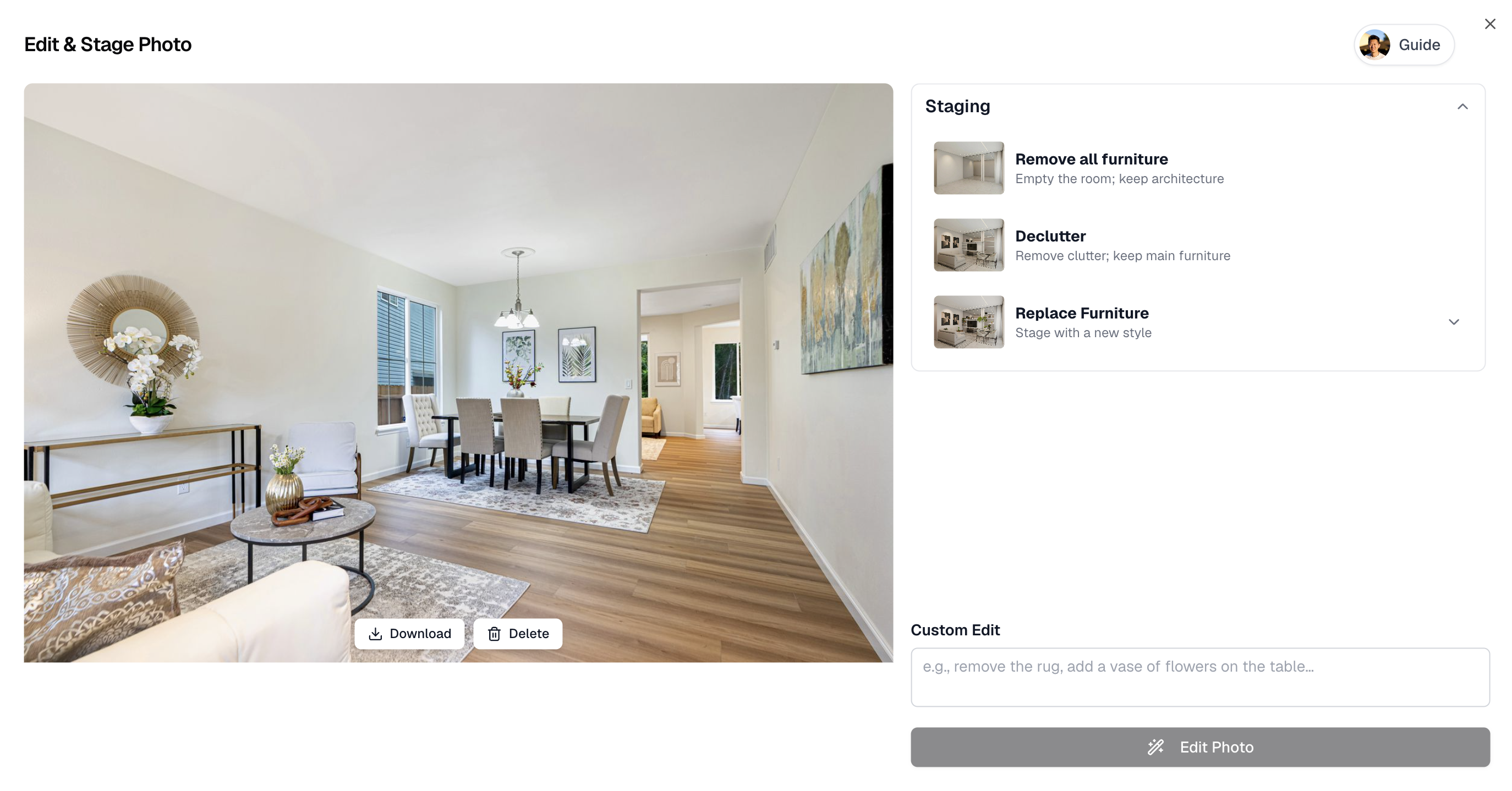
VideoGuru photo editing can stage or restyle listing photos before turning them into videos.
VideoGuru's photo editing and virtual staging workflow can support this type of content, including staging, decluttering, sky replacement, twilight edits, and continuing edited photos into a video workflow.
8. Before-and-After Listing Improvement Video
Before-and-after videos are excellent for seller trust. They show that your marketing does more than upload raw photos. Use this format for virtual staging, decluttering, twilight edits, sky replacement, curb appeal improvements, and photo enhancement.
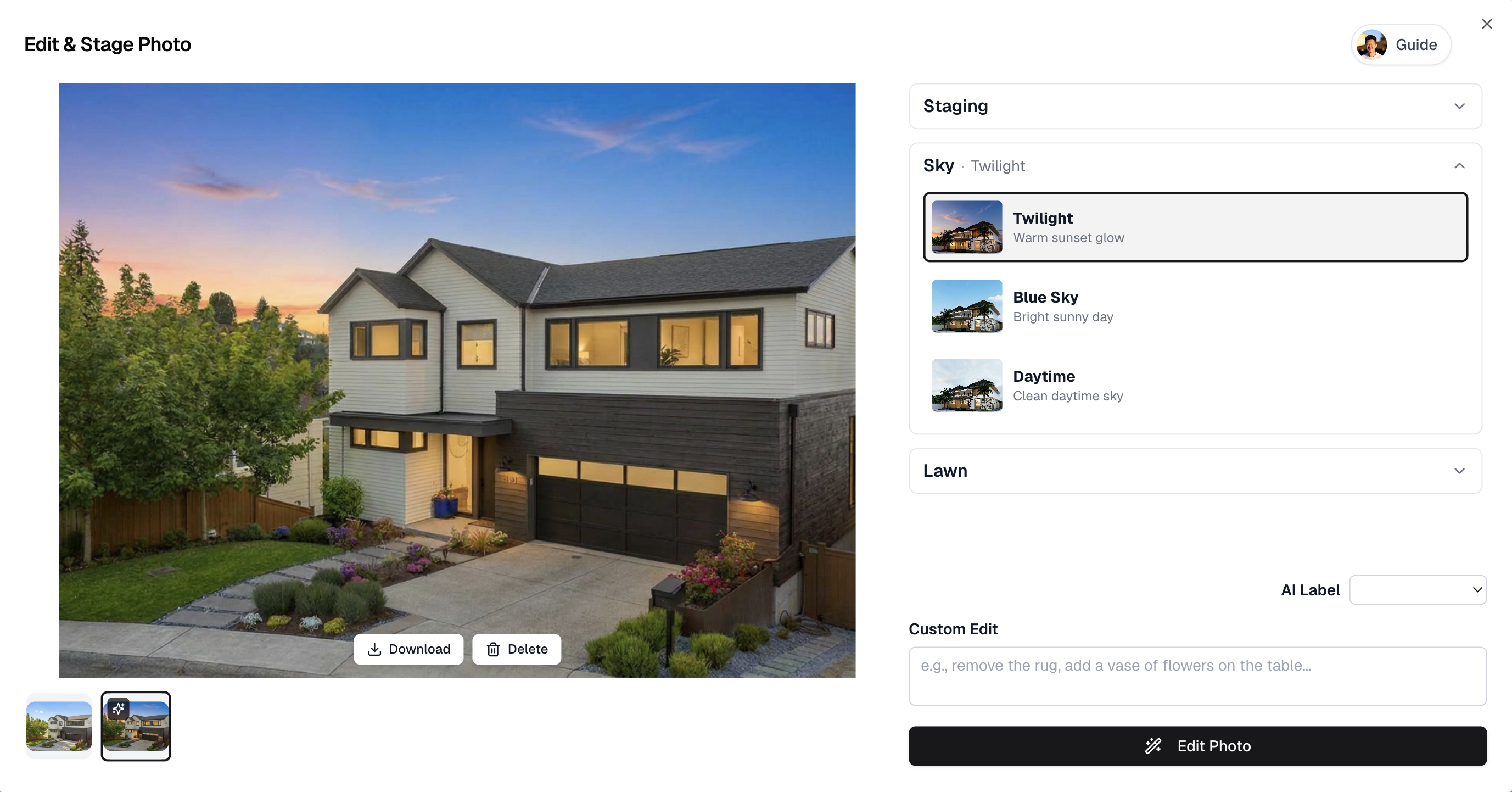
Twilight and atmosphere edits can become short before-and-after marketing clips.
9. Market Update Video
Market update videos help agents attract sellers and stay visible between listings. Keep it short: median price, inventory, days on market, buyer demand, what it means for sellers, and what it means for buyers.
A market update can be a simple agent speaking video. VideoGuru's editor includes features that support polished speaking videos, such as text effects, music/audio controls, and noise reduction.
10. Client Testimonial Video
A client testimonial video builds trust faster than a written review. Ask the client what they were worried about, what the experience was like, what result you achieved, and what they would tell someone considering you as an agent.
Then create two versions: a full 1-2 minute testimonial for your website and a 15-30 second social version. This is one of the best video marketing assets for converting future sellers.
11. Agent Introduction Video
An agent introduction video answers the question: "Why should I work with you?" Include your market, niche, process, personality, and promise to clients.
This video belongs on your website, YouTube channel, social profiles, email signature, and listing presentation. If you record yourself speaking, you can use VideoGuru's editor to clean up the video, add text, adjust audio, and keep the final result polished.
12. Seller Recap Video
After a listing goes live, create a short recap video for the seller. Include the final listing video, social clips created, where the video was published, open house promotion, early engagement, and next steps.
This reassures the seller that marketing is active, and it gives you a reusable example for future listing appointments.
Unique Real Estate Marketing Ideas Beyond the Listing Video
The 12 formats above are the core of most agents' realty marketing ideas. The ideas below are the ones that get you remembered, because few agents in any market do them consistently. Each one still comes back to a short video you can make from photos or phone clips.
- Agent photoshoot ideas that double as video. Instead of a headshot-only session, book a 60–90 minute lifestyle shoot: you at a coffee shop you recommend, walking a neighborhood you sell, on a porch of a listing. Ask the photographer for 5–10 short vertical clips during the same session. One shoot gives you a year of profile photos, bio images, and agent introduction videos. Our listing photo shooting guide covers how to brief a photographer so both stills and clips come out usable.
- "Day in the life" of a listing. Film the same room at 8 a.m., noon, and dusk. Cut it into a 20-second clip that shows how the light moves. Buyers ask about natural light in almost every showing; this answers it before they ask.
- Local business spotlights. A 30-second video on the bakery, gym, or school near your farm area. Tag the business. They share it, and you reach their followers, most of whom live within 5 miles of you.
- Sold-price reveals. Show the listing, the list price, the number of offers, and the final price. Homeowners save these because they want to know what their own home is worth.
- Seller "what we did" recaps. A before-and-after of the prep work: decluttering, paint, virtual staging, twilight photos. This is a listing presentation you can send to the next seller.
- Direct-mail with a QR code to a video. A postcard alone gets a 1–2% response rate. A postcard with a QR code to a 30-second neighborhood market update gives people a reason to scan and a face to remember.
Commercial real estate marketing ideas follow the same logic with a different audience. Investors and tenants care about traffic counts, floor plates, parking ratios, and nearby anchors, not kitchen finishes. A 45–60 second drone-to-interior video that overlays those numbers as on-screen text outperforms a photo deck on LinkedIn, where most commercial deals get their first look. Add a 15-second "site context" clip that shows the highway access and neighboring tenants.
If you are a photographer or media company, marketing to realtors needs its own unique ideas. The one that works best: make a free 30-second sample video from an agent's existing MLS photos and send it with a one-line note. Agents rarely ignore a finished video of their own listing. A monthly "3 listings we shot this month" reel and a short case-study clip of an agent who booked more listings after adding video both work as follow-ups. For more formats to rotate through, see our 30 days of real estate video ideas for social media.
How to Turn One Listing into Multiple Marketing Videos with VideoGuru
The most efficient real estate video marketing strategy is not "shoot more." It is "repurpose better." From one listing, you can create a full walkthrough video, just-listed Reel, open house invitation, top 3 features video, neighborhood teaser, email video, seller recap video, and before-and-after improvement clip.
| Asset | VideoGuru Output |
|---|---|
| Listing photos | Photo-to-video walkthrough |
| Walkthrough clips | Edited property tour |
| Empty room photo | Virtual staging reveal |
| Exterior photo | Twilight or curb appeal video |
| Agent speaking clip | Market update or intro video |
| Final listing media | Branded social clips |
Create your first real estate marketing video
Upload listing photos or clips, add music and branding, and export a polished real estate video with VideoGuru.
See the VideoGuru workflowHow to Build a Real Estate Agent Marketing Plan Around Video
A real estate agent marketing plan does not need to be a 20-page document. It needs four decisions: who you serve, what you publish, how often, and how you measure it. Most agents skip the first one. Pick a farm area or a buyer type (first-time buyers, downsizers, relocations) and write it down. Every video, postcard, and email should speak to that person.
Here is a working marketing plan for real estate agents that fits in one page:
- Weekly: one listing or neighborhood video, two short social clips cut from it, one email to your database with the video embedded. Time cost with an AI editor: 2–3 hours a week.
- Monthly: one market update video (days on market, median price, inventory), one client testimonial or sold-price reveal, one direct-mail piece to your farm area with a QR code to the market update.
- Quarterly: refresh your agent introduction video and your listing presentation with your last three months of results.
- Budget: most solo agents spend 10–15% of gross commission on marketing. A video-first plan lets you shift money from print to a $20–$100 a month tool plus $200–$500 a month in boosted posts.
Marketing for new real estate agents follows the same plan with one change: you have no sold listings to show, so lead with local knowledge. A weekly 60-second neighborhood video and a monthly market update are the fastest way to market yourself as a real estate agent before you have transactions. Two platforms, three posts a week, for 90 days. Add a third platform only when the first two run on autopilot. The story of how one solo realtor turned a daily video into leads is a realistic model for the first year.
Online marketing for real estate agents comes down to three places: your Google Business Profile (post the same video there every week; it is the most under-used free channel in real estate), your social accounts, and your email list. Your real estate agent marketing materials should share one look across all of them: same logo, same two colors, same intro and lower-third on every video, same headshot on the listing presentation and the postcard. Recognition builds when the pieces match. Our guide on building a real estate brand with video content shows how to set that up once and reuse it, and the photo and video content calendar turns the plan above into a schedule.
Where to Post Real Estate Marketing Videos
Different video types work better on different platforms. You do not need to post everywhere on day one. Start with the places where your buyers and sellers already pay attention.
| Platform | Best Real Estate Videos |
|---|---|
| Instagram Reels | Just listed videos, staging reveals, top 3 features |
| TikTok | Short hooks, neighborhood clips, property highlights |
| YouTube | Full walkthroughs, market updates, neighborhood guides |
| Open house videos, local listing promotions | |
| Website | Listing videos, testimonials, agent intro |
| Just listed videos, open house invites, seller updates |
For most agents, the best starting point is one full listing walkthrough, two short social clips, one open house or showing CTA video, and one market or neighborhood video per week.
Real Estate Agent Marketing Companies vs. AI Tools: Which Should You Use?
Real estate agent marketing companies fall into three groups. Full-service agencies (branding, website, social, ads, video) charge $1,500–$5,000 a month and suit top producers and teams doing 40+ transactions a year. Listing-media companies (photographers and videographers) charge $150–$600 per listing for photos and a video and are the right call when you want a professional shoot for a $2M+ luxury listing. Social media managers run $500–$2,000 a month to post and engage on your behalf, but they still need you to supply footage.
AI tools sit underneath all three. If someone asks, "What tools are recommended for creating professional marketing videos?", the honest answer depends on what you already have. For agents who have listing photos and 10 minutes, VideoGuru turns those photos or phone clips into a branded listing video with motion, music, and vertical plus horizontal exports, and no editing timeline. For agents who want to film themselves talking, CapCut or Descript handle captions and cuts. For photographers and media companies who deliver 20+ videos a week, VideoGuru's batch workflow replaces a per-video editor. For a viral-style social clip, the tool matters less than the first 2 seconds: a strong hook, on-screen text, and a 15–30 second runtime. Our roundup of the best AI video editors for real estate compares pricing and turnaround.
A simple rule: hire a company when a single listing justifies the spend or when your volume needs a team; use a tool when you want video on every listing without adding cost per video. Many agents do both: a photographer shoots the flagship listing, and an AI tool turns every other listing's MLS photos into a video the same day.
Keeping up with real estate marketing news matters more now than it did two years ago, because the tools change monthly. The AI news that affects agents most in 2026: MLS and NAR rules on labeling AI-edited photos, platform changes to Reels and Shorts length limits, and the shift of buyer search into AI assistants that cite specific agents and listings. We track those changes in AI real estate marketing trends for 2026 and in our state of AI real estate video report. Check both once a quarter and adjust the plan above; you do not need to react to every headline.
FAQ
What videos should real estate agents create?
Real estate agents should create listing walkthrough videos, just-listed videos, neighborhood highlights, open house invitations, market updates, client testimonials, agent introduction videos, virtual staging reveals, before-and-after listing improvement videos, and short social clips.
How do realtors use video marketing?
Realtors use video marketing to promote listings, explain neighborhoods, attract buyers, build seller trust, share market updates, and stay visible on social media. A strong video workflow turns one listing into multiple assets for websites, email, Instagram, TikTok, YouTube, Facebook, and listing presentations.
Can VideoGuru create real estate marketing videos from listing photos?
Yes. VideoGuru can turn listing photos into real estate marketing videos. Agents can upload photos, choose the best shots, arrange them into a property story, add camera motion, music, branding, and effects, then export the finished video.
Is VideoGuru only for listing videos?
No. VideoGuru can support multiple real estate marketing video formats, including listing walkthroughs, photo-to-video teasers, social clips, virtual staging reveals, before-and-after videos, agent speaking videos, and branded marketing content.
Do agents need video editing experience to use VideoGuru?
No. VideoGuru is designed to help real estate agents create polished property videos without learning a traditional editing timeline. The workflow is built around uploading media, selecting and ordering shots, applying real estate-focused enhancements, and exporting finished videos.
Can you suggest creative ideas for real estate video marketing campaigns?
Yes. The campaigns that get the most response are built around a series, not a single video: a 4-week "sold in our neighborhood" series with one sold-price reveal a week, a "day in the life of a listing" series that shows the same home at three times of day, or a local business spotlight series where you feature one shop a week and tag them. Run each series for 4–8 weeks on two platforms, cut every video to 15–60 seconds, and send the best one to your email list. Agents who run a series see more consistent reach than agents who post one-off listing videos, because followers know what to expect.
Conclusion
Real estate video marketing works when it is repeatable. You do not need a new production plan for every listing. You need a system that turns the media you already have into useful videos for buyers, sellers, social media, email, and your website.
Start with one listing walkthrough. Turn it into a just-listed clip, an open house video, a top-features Reel, and a seller recap. Add neighborhood videos, testimonials, and market updates as your weekly rhythm.
VideoGuru makes that workflow faster by helping agents turn listing photos and clips into polished real estate marketing videos with AI, music, branding, effects, photo editing, and export options built for real estate.
Ready to create your first real estate video?
Use VideoGuru to turn listing photos or clips into branded real estate marketing videos with AI.
Start for free



