

Chengran (Felix) Guan
2026-09-04 · 15 min read
Open House Video:
Walkthrough Tips That Turn Lookers into Leads
Open house video is a three-part system: a teaser walkthrough that builds attendance before the event, a tour that keeps working during it, and a recap you send to every no-show within 24 hours. It is not about convincing buyers who never planned to come. It is about capturing the buyers who are already searching — and nearly all of them start online.
The 2025 NAR Profile of Home Buyers and Sellers found that recent buyers spent about 10 weeks searching before buying, and 52 percent found the home they purchased online. Only about 4 percent found it through a yard sign or an open house — a conclusion Opendoor's 2026 analysis of open house value echoes. The practical takeaway: an open house is not a direct-sale channel. It is a marketing event that wins online attention first, then turns that attention into attendance, sign-in leads, and seller confidence. Video is the bridge between the screen and the front door.
Key Takeaways:
- Buyers search for about 10 weeks and most find their home online, so open house marketing must win attention where buyers already look.
- Run open houses for lead capture and seller confidence, not as a direct-sale channel — only about 4 percent of buyers discover their eventual home at one.
- Give every open house three videos: a teaser walkthrough, an on-site loop or live clip, and a 24-hour recap for no-shows.
- A 90-second room-by-room walkthrough shot on a phone beats a polished video that ships late. Consistency beats production value.
- AI editing turns raw walkthrough footage into a captioned, music-scored video in minutes — no editor required.
Why Open Houses Still Matter — and What Video Changes
Open houses do three jobs that no other marketing event does. First, they give online buyers a low-pressure reason to see the home in person. Second, they put you face to face with buyers who are not yet working with an agent — the sign-in sheet is a buyer database you earned in one afternoon. Third, they signal effort to the seller, which matters when you pitch the listing in the first place.
Video makes each of those jobs bigger. Listings with interactive media measurably outperform flat listings: Zillow reported that homes with 3D Home tours earn 81 percent more views and 53 percent more saves, and its 2026 guidance shows homes with interactive floor plans saved 79 percent more than those without. A walkthrough video is the same dynamic applied to your open house — it gives the listing more views, more shares, and more reasons for a browser to become a visitor.
Video also protects the weekend. Buyers tour homes on their own schedule now, and many will simply not make your 1 to 4 p.m. window. A walkthrough they can watch at 9 p.m. on a Tuesday keeps your listing in front of them during the full 10-week search window NAR documents. The buyers who skip your open house are not lost — they are just watching later.
The Three-Video System for Every Open House
Do not treat video as one deliverable. Treat it as a timeline with three distinct pieces, each with its own job and deadline. A teaser walkthrough is a short, energetic tour published before the event to build attendance. An on-site video is a silent walkthrough loop or a live clip that works the room during the open house itself. A recap video is a follow-up sent within 24 hours to everyone who registered but did not show up.
- Teaser walkthrough — publish 3 to 5 days before. Sixty to ninety seconds. Walk the best flow of the home, end with an on-screen card: open house date, time, and address. This is the video that gets shared in local Facebook groups, neighborhood apps, and your email list.
- On-site video — event day. Put the full walkthrough on a loop at the sign-in table so late arrivals and spouses wandering separately still see the home at its best. Record a 30-second live clip for Stories — "We are live at 123 Oak Street" — and pin a QR code at the door that opens the walkthrough and your contact form.
- Recap video — within 24 hours. Thirty to forty-five seconds. Show the best moments, then say the honest thing: "Missed it? The home is still available for a private tour." Send it to every sign-in guest, every RSVP who did not come, and the rest of your database. This video does the lead generation an open house was always supposed to do.
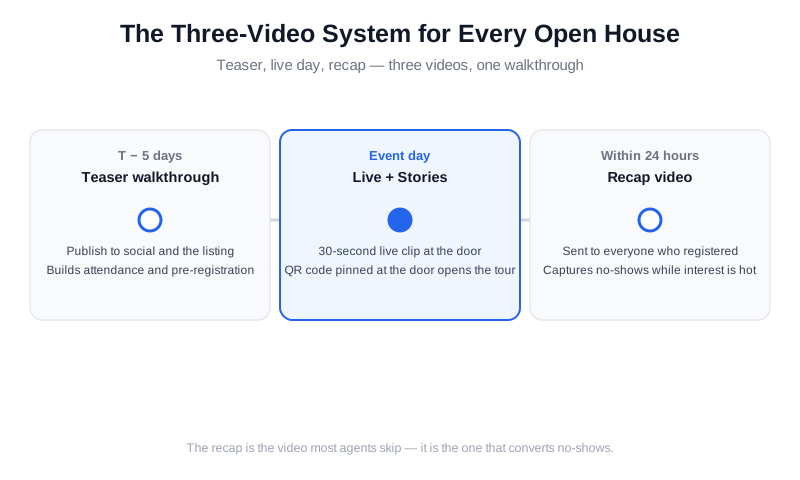
The three-video open house timeline: teaser at T-5 days, live content on event day, recap within 24 hours.
The 90-Second Walkthrough Shot List
A walkthrough video is not a highlight reel — it is a scripted tour in a fixed order. Buyers watch it to answer one question: does the layout work? Shoot in the order a buyer would tour the home, and the edit assembles itself.
- Curb and front door. Start wide, from the street. This is your first impression and your thumbnail.
- Entry and main living spaces. Walk through the living room, dining area, and kitchen in one continuous flow. Three to five seconds per room.
- Bedrooms and bathrooms. Pause at the primary suite; keep secondary rooms brief. A bathroom gets two seconds — buyers do not need a tour of the toilet.
- Outdoor space. End in the backyard if there is one, then close on the exterior. Buyers remember the last thing they see.
The technical list is short. Shoot 4K at 30 or 60 frames per second, walk slowly, and avoid fast pans. Turn every light on and open every blind before you start. Close closet doors, clear counters, and put the toilet seats down — the same prep you would do for listing photos, covered in detail in our listing photo shooting guide. Hold each clip for a full three seconds so you have room to cut. If you shoot vertical clips for Stories, shoot them separately; do not crop a horizontal walkthrough into vertical or you will lose half the room.
Should you hire a pro? For your top-tier listings, yes — a videographer or a photographer who also shoots video will deliver better motion and sound. But do not let the perfect listing block the good ones. A phone shot on a gimbal, stabilized and well lit, is enough for the vast majority of open house marketing. If you are deciding where media budget goes first, our photo vs video priority guide walks through which listings earn video and which are fine with photos alone.
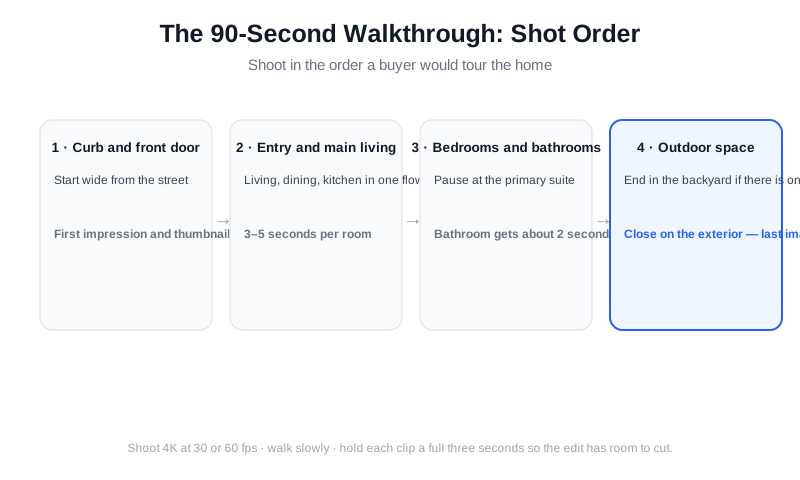
Shoot in tour order and the edit assembles itself: exterior, entry, living spaces, bedrooms, outdoor finish.
How Much Does a Real Estate Walkthrough Video Cost?
A real estate walkthrough video costs anywhere from nothing to several thousand dollars, and the spread comes down to who shoots it and who edits it. Do it yourself on a phone and the hard cost is a gimbal ($100–$200 once) plus your time — about 20 minutes to film a typical home using the shot list above. A freelance editor who cuts your footage runs $75–$300 per video with a two-to-five-day turnaround. A professional videographer who shoots and edits a standard 60–120 second interior walkthrough video typically charges $300–$1,000; add $150–$400 for drone exteriors. Luxury listings above $2M usually budget $1,500–$5,000 for a cinematic tour with agent narration and a full crew. These are typical market ranges, and prices in major metros sit at the top of each band.
Which tier is right depends on the listing, not your ego. Run the math against commission: a $500 video on a $400,000 sale is about 4 percent of a 3 percent side, and it is easily justified if it brings two extra serious buyers to the open house. On a $200,000 condo the same spend is harder to defend, which is why most agents shoot the mid-market walkthroughs themselves and reserve the pro for listings where the media is the marketing. Photographers who already shoot the stills can add video as a $200–$400 upsell — see how one photographer added drone and video to every listing without doubling shoot time.
If you want a real estate walkthrough video tutorial rather than a price list, the shot list above is the tutorial: exterior approach, entry, main living space, kitchen, primary suite, standout feature, then the yard, each clip held for three seconds, walking slowly with the phone at chest height. The detailed version with room-by-room angles and timing lives in our listing video shot list. Follow it once and the second home takes half the time.
How to Get the Walkthrough in Front of Buyers
A great walkthrough with no distribution plan is a private tour. Before you publish the teaser, decide where it lives and who gets it first.
- Email your database first. Your past clients, current buyers, and sphere get the teaser before anyone else. Subject line: "First look: 123 Oak Street — open Sunday." This is the list most likely to share it.
- Post where the listing lives. Add the video to the listing on portals that accept it and check your local MLS video requirements before uploading — rules on duration and format vary by market.
- Create the event. Build a Facebook event and an Instagram countdown so the open house appears in feeds as an event, not a post. Remind at T-3 days and the morning of.
- Go hyperlocal. Neighborhood Facebook groups and apps are where open house announcements outperform every other channel. Post the teaser there with the address and hours.
- Put a QR code on the sign. The yard sign and the door sign link to the walkthrough and your contact form. Every car that slows down is a potential view.
Then measure what happened. Track views and saves on the listing, attendance against RSVPs, and new contacts on the sign-in sheet. Those three numbers tell you whether the video system is working better than your old open house routine — see which video content actually converts for the full breakdown of what to watch.
What Are the Best Tools for Creating Real Estate Video Walkthroughs?
There is no single best real estate video walkthrough app — there is a best one for each stage of the job, and most agents need two. For capture, your phone's native camera is enough; a gimbal app like DJI Mimo or the Insta360 app adds smooth tracking shots, and apps like Zillow 3D Home or Matterport turn a walkthrough into a 3D tour buyers can navigate on their own. For editing, general video walkthrough apps such as CapCut, Splice, and InShot are free or under $10 a month and work well if you are comfortable trimming clips, syncing music, and adding captions by hand — budget 45–90 minutes per video the first few times. Desktop editors like Premiere Pro and DaVinci Resolve give the most control and are what videographers use, at the cost of a real learning curve.
The third category is real estate video apps that do the editing for you. Agents who want a finished, branded walkthrough from their own phone footage in about 10 minutes — captions, music, voiceover, vertical and horizontal exports, no timeline — should look at VideoGuru, which is built for exactly that and also edits the listing stills in the same workspace. Teams and brokerages shipping video on every listing get the most from that flat-fee model, because per-video editing costs disappear; one team put video on 200 homes a year this way. Videographers and media companies tend to keep a pro editor for hero listings and use an AI tool to clear the volume work, a split covered in our videographer AI workflow guide.
When you compare tools, test three things with one real walkthrough: how long the finished video actually takes, whether the captions and colors are usable without fixes, and whether it exports the formats your distribution list needs. Our roundup of the best AI video editors for real estate runs that test on the major options and lists pricing for each.
Edit and Distribute in Minutes with AI
The reason most agents skip open house video is not the shooting — it is the editing. Trimming dead air, syncing music, adding captions, and exporting two formats used to cost an evening per video. AI editing compresses that to minutes, which changes what is worth filming. When one walkthrough produces your teaser, your on-site loop, your recap, and your Stories cut, the system above stops being aspirational.
VideoGuru is an AI real estate media platform built for exactly this workflow. You upload the walkthrough clips and it assembles the finished video — auto-captions for the muted-scroll viewers, licensed music, AI voiceover for the "here is why you will love this kitchen" narration, and effects like smooth speed ramps between rooms. It exports vertical for Stories and horizontal for email and portals, so one edit covers every stop on the distribution list. If you are new to the workflow, our guide to creating listing videos in under 10 minutes walks through it step by step.
The same platform handles the listing's stills, because an open house is sold on the whole visual package. VideoGuru's photo tools give you one-click virtual staging, decluttering, and color correction for the listing photos that run alongside your walkthrough — so you are not stitching together five different tools to market one house.
An experienced agent walks through how to show a home — the room-by-room flow your walkthrough should mirror.
Walkthrough Video Tips for Real Estate Developers and Builders
Developers and builders run the same three-video system on a longer clock. A new-construction open house or model-home launch is not one date; it is a sales cycle that can last 6–18 months, so the walkthrough library grows with the project. Start with a building walkthrough video of the model unit or show home — 90 seconds, same shot list — then add short updates as phases complete: framing, finishes, the amenity deck, the lobby. Buyers reserving pre-construction rely on those clips to see progress, and a monthly 30-second update keeps deposit holders from going quiet. For projects with multiple floor plans, shoot one interior walkthrough video per plan rather than one long tour; a buyer looking for a two-bedroom will not sit through the studio.
A few video marketing tips for real estate developers that differ from resale: lead with the renderings only until the first unit is finished, then switch to real footage as fast as possible, because buyers discount renderings heavily. Put a website walkthrough video on the project's landing page above the fold — a 60–90 second embedded tour that plays without sound and with captions — and link every ad and email back to that page rather than to a social post you do not control. Track the metric that matters for a project, which is registrations and appointments per view, not likes. Many teams also use AI renovation visualization to show finish options inside real footage of the model unit, and AI voiceover to narrate each plan without booking a presenter for every cut.
The Open House Is Content, Not Just an Event
One open house weekend can feed your content calendar for a month, and that is where the real return lives. The teaser becomes the listing video. The recap becomes a social post. A 15-second clip of the backyard becomes a separate Reel. The "open house is over, here is what you missed" email becomes a template you reuse on every listing.
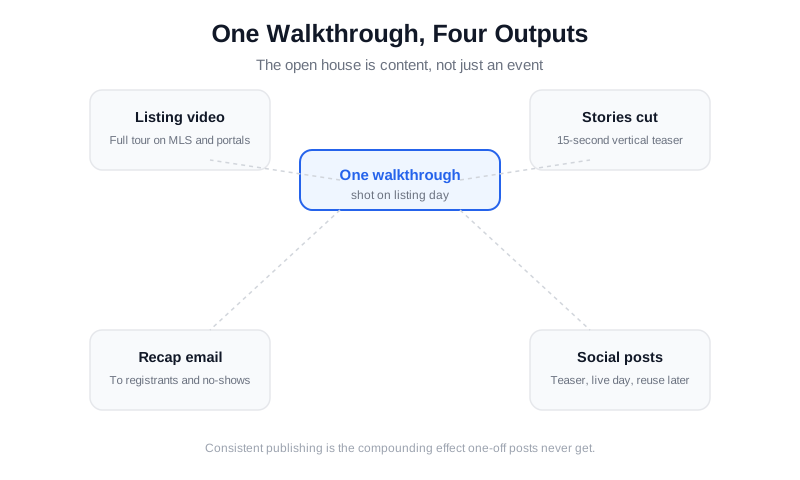
One walkthrough, four outputs: listing video, Stories cut, recap email, and social posts.
Agents who publish consistently see the compounding effect that one-off listing posts never get. Our guide to repurposing one listing into 30 pieces of content shows the full matrix, and the video marketing strategy guide explains how often to post and where. The open house video system is not an extra task — it is the content engine for the listing, scheduled around a date that already exists.
Frequently Asked Questions
How long should an open house walkthrough video be?
Keep the teaser between 60 and 90 seconds and the recap between 30 and 45 seconds. Buyers decide whether to keep watching in the first few seconds, so a tight tour that shows the flow of the home outperforms a longer cut that lingers in every room. Vertical Stories versions should run even shorter — 30 to 60 seconds — because they are competing with everything else in the feed.
Do walkthrough videos actually bring more people to open houses?
They bring more of the right people. No video can manufacture buyers who are not in the market, and only about 4 percent of buyers discover the home they eventually purchase at an open house. What a walkthrough does is move the 52 percent who shop online: listings with interactive media earn more views and saves, and a teaser gives local buyers a reason to trade the screen for the street. When they still do not come, the recap captures them as leads instead of losing them.
Can I make a good open house video with just my phone?
Yes. Modern phones shoot 4K with built-in stabilization, which covers the basics. What separates a watchable walkthrough from unwatchable footage is preparation, not equipment: lights on, blinds open, counters clear, slow steady movement, and three-second clips in tour order. For your highest-priced listings, a professional videographer is worth the upgrade — but a phone walkthrough published on time beats a professional video that ships after the open house.
When should I post the teaser before the open house?
Publish the teaser three to five days before the event. That gives email and social algorithms time to distribute it, gives buyers time to see it multiple times, and leaves room for a reminder post at T-3 days and another the morning of. Posting the day before leaves most of your database — and most neighborhood groups — without enough lead time to plan a Saturday or Sunday afternoon around your home.
How can I use AI for real estate lead generation from open house video?
Use AI to remove the two steps that usually stall the system: editing and follow-up. An AI editor turns one walkthrough into the teaser, the recap, and three to five vertical clips in about 10 minutes, so every open house gets video instead of just the flagship listing. Then use AI to write the recap email and the 24-hour follow-up texts from the sign-in sheet, and let a CRM assistant score which no-shows watched the video to the end — those are the calls to make first. Agents who run this loop consistently report two to three times more follow-up conversations per open house than a sign-in sheet alone, because every contact gets the video and a personal message within a day.
Which platforms are most popular for sharing real estate walkthrough videos?
For open house walkthroughs the order is: the listing itself (MLS and Zillow, Realtor.com, and Redfin where video is accepted), your email list, Instagram Reels and Stories, Facebook (still the strongest for buyers over 50 and for local groups), YouTube for the horizontal cut that search engines index, and TikTok if your buyers are under 35. Post the same 60–90 second video everywhere but cut a vertical version for Reels, Stories, and TikTok rather than cropping the horizontal one. Our real estate video platform guide lists length, format, and posting cadence for each channel.
Ready to turn your next open house into a three-video system? VideoGuru's AI editing tools can caption, score, and finish your walkthroughs in minutes — and its photo tools stage and clean the listing stills alongside them. Start for free at VideoGuru.
Putting It All Together
Open houses are not dying — they are changing jobs. Buyers no longer discover homes there; they discover homes online and confirm them in person. That makes video the most important tool in your open house marketing: a teaser walkthrough that earns the attendance, an on-site loop that carries the event, and a recap that turns every no-show into a lead. Shoot in tour order, publish on a schedule, and let AI handle the editing. The listing gets more views, the seller sees the effort, and your sign-in sheet gets a second life as a follow-up list.




